Calculation of the Total Harmonic Distortion & Psychoacoustic Audio Analysis
Set the fundamental frequency of the signal and the harmonic levels in decibels:
Sigma Calculator (V1.2) - Professional Accounting HTML Calculator (for PC and smartphone).
This calculator is made with Google's Gemini AI. It runs in a web browser as an HTML page. You need to refresh the page to enter full screen mode on your smartphone. For information on physical keyboard support, please see the "Shortcuts info" file.
Version 1.2 - the zero after decimal point bug has been fixed.
Version 1.1 - fixed a bug in the TAX (%) input field.
Version 1.0 - first release.
Download: NaLex Sigma Calculator V1.2
---
Electronika IM-02 (V1.1) - HTML simulator of the game "Электроника ИМ-02" (for PC and smartphone).
This game is made with Google's Gemini AI. It runs in a web browser as an HTML page. Control using keys (Q, A, P, L) on your PC keyboard or buttons on your smartphone screen.
Version 1.1 - fixing a sound bug. Version 1.0 - first release.
Download: NaLex Electronika IM-02 V1.1
---
Old versions download:
HTML Battle Tetris (V2.2) - Tetris battle game between two bots (for PC and smartphone).
This game is made with Google's Gemini AI. It runs in a web browser as an HTML page. The "NEXT" button enables the bot to track the next figure. The game state is automatically saved whenever you change anything in the browser. After resetting, you need to refresh the page to enter full-screen mode.
Version 2.2 - improved bot algorithm.
Version 2.1 - improved bot algorithm.
Version 2.0 - added automatic trash lines and trash line attack, improved bot algorithm.
Version 1.0 - first release.
Download: NaLex Battle Tetris V2.2
---
Old versions download:
HTML Tetris (V2.0) - Tetris game for PC and smartphone.
This Tetris game is made with Google's Gemini AI. It runs in a web browser as an HTML page. A ghost mode is implemented, which shows where the figure will fall. Controls are implemented using arrow keys on a PC keyboard and buttons on a smartphone screen. After resetting, you need to refresh the page to enter full-screen mode.
Version 2.0 - a bot for automatic assembly has been implemented (takes into account the next figure).
Version 1.1 - automatic state saving has been added and full-screen mode has been implemented.
Version 1.0 - first release.
Download: NaLex Tetris V2.0
---
Old versions download:
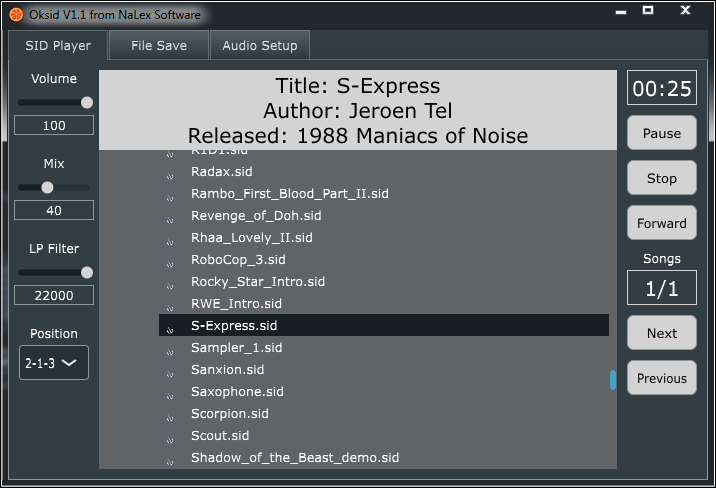
Oksid (V1.3) - Stereophonic SID Player.
SID player (synthesizer) with the ability to save music in different audio formats.
Version 1.3 - improved user interface.
Version 1.2 - volume bug fixed.
Version 1.1 - added fast forward button, new shortcuts added.
Version 1.0 - first release, support for PSID files only.
Download:
Win EXE, 32/64-bit: Oksid V1.3
Linux Debian, 64-bit: Oksid V1.3 Debian
Download:
Win EXE, 32/64-bit: Oksid V1.2
Linux Debian, 64-bit: Oksid V1.2 Debian
---
CapMeter V2.1 - capacity meter for Arduino.
Capacity meter with automatic selection of the measurement range. It measures the charging and discharging times of the capacitor, and converts the measured values into capacitance.
The measured capacity is from 10pF to 10mF (10000uF).
A one-time meter calibration is required. For calibration, you need to turn on the meter with the calibration button pressed. Then connect the reference capacitors, the value of which is indicated on the display. The connection of each capacitor must be confirmed by pressing the calibration button. The values of the reference capacitors can be changed in the "set calibration caps" section.
Information is output to an external display and to a serial port. Customize the code for the display you are using (U8X8_ON and I2C_LCD_ON macros).
Warning! The capacitor must be completely discharged before measurement. Otherwise, the device may be damaged.
It is recommended to put such protection on the input.
Version 2.1 - added support for various displays.
Version 2.0 - added calibration.
Version 1.0 - first release.
Download Sketch: CapMeter V2.1
Download Sketch: CapMeter V2.0
Download Sketch: CapMeter V1.0
---
SigmaCalc (V1.8) - Accounting Calculator.
Values can be entered and copied from the display by clicking on it.
Version 1.8 - display bug fixed.
Version 1.7 - display and markup bugs fixed, root modernization.
Version 1.6 - root bug fixed.
Version 1.5 - root bug fixed.
Version 1.4 - root bug fixed.
Version 1.3 - memory bug fixed.
Version 1.2 - markup bug fixed.
Version 1.1 - bugs fixed.
Version 1.0 - first release.
Download:
Win EXE, 32/64-bit: SigmaCalc V1.8
Win EXE works on Linux and macOS with Wine.
tags: calculator, mu, markup, mark up, tax, cost, sell, calculator
FilesComparator (V1.3)
This program allows you to compare all files in two folders.
Version 1.3 - added a progress bar.
Version 1.2 - difference search bug fixed.
Version 1.1 - files search bug fixed.
Version 1.0 - first release.
Download:
Win EXE, 32/64-bit: FilesComparator V1.3
Linux Debian, 64-bit: FilesComparator V1.3 Debian
Win EXE works on Linux and macOS with Wine.
---
tags: file difference, files comparator
IRbis VST (V2.0) - IR Cabinet Simulator.
The impulses can be mixed, placed in series or in parallel.
To load a file, click on the information line.
Version 2.0 - the possibility of using two impulses.
Version 1.0 - first release.
Download:
Win VST, 32/64-bit: IRbis V2.0 Win VST
Win VST3, 32/64-bit: IRbis V2.0 Win VST3
Linux Debian VST, 64-bit: IRbis V2.2 Debian VST
---
tags: impulse response, IR loader, IR player, convolution
Detective (V2.0) - Einstein-style puzzle game.
Version 2.0 - increased number of hints.
Version 1.3 - the cross has been replaced by a star.
Version 1.2 - bug fixed and double closing hints.
Version 1.1 - bug fixed.
Version 1.0 - first release.
Download:
Win EXE, 32/64-bit: Detective V2.0
Linux Debian, 64-bit: Detective V1.3 Debian (password 1234)
Android 6+ APK, armeabi-v7a & arm64-v8a: Detective V2.1 Android
Win EXE works on Linux and macOS with Wine.
---
Ratio Meter VST (V1.0) - Compressor Test.
Instructions for using the plugins.
Assemble the sequence: Ratio Generator, Compressor, Ratio Meter. On the Ratio Meter, press Reset. On the Ratio Generator, press Start. After stopping the generator, use the cursors to measure the ratio and threshold of the compressor.
Download:
Win VST, 32/64-bit: Ratio Meter V1.0
---
NC2 - Compressor, VST & AU (V3.1)
Download:
Win VST, 32/64-bit: C2 Compressor V2.0
MacOSX VST & AU, 32/64-bit: C2 Compressor V2.0 VST+AU
---
Noise Katana VST & AU (V1.0) - Dynamic Noise Suppressor.
Controls:
Sensitivity - sensitivity knob
Stereo - mono or stereo switch (in the upper left corner)
Instructions for using the plugin.
Set the Sensitivity knob to maximum (far right) and decrease the sensitivity until you stop hearing noise during pauses. If noise is also heard in the desired signal, then you need to further reduce the sensitivity of the noise suppressor.
Download:
Win VST, 32-64-bit: NoiseKatana V1.0
Mac OSX VST+AU, 32-64-bit: NoiseKatana V1.0 VST+AU
---